Switch Domain Global Action
Bulk update email domains in your migration user list after domain transfer.
Overview
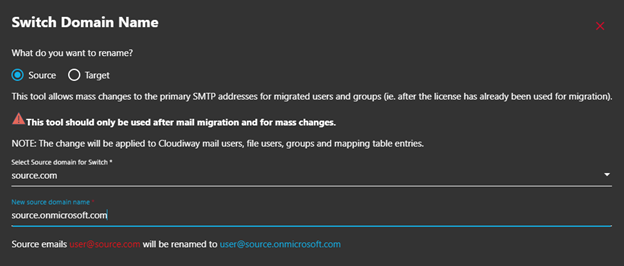
The "Switch Domain" global action tool is used during Microsoft 365 tenant-to-tenant migrations when domains are transferred between tenants. It performs bulk updates to the migration user list by replacing email domains with new ones.
Domain Switch Process
The Problem
Why This Tool Is Needed
During Microsoft 365 migrations, users initially map to different primary SMTP addresses in source and target tenants because one domain cannot exist in two Microsoft 365 tenants simultaneously.
When the source domain is moved to the target tenant during the final migration stages, the migration tool returns an error indicating the source SMTP address no longer exists.
The Challenge
You cannot edit migration user list details once a migration pass has started. The Switch Domain tool solves this by performing bulk updates.
The Solution
Using Switch Domain
Access Global Actions
Navigate to the Global Actions menu in your migration project.
Select Switch Domain
Choose the Switch Domain option from the available actions.
Enter New Domain
Specify the replacement domain (typically the onmicrosoft.com address for the source tenant).
Apply Changes
Execute the action to bulk update all affected entries in the migration list.
Update Connectors
Modify the connectors by adding or removing domain names so they reflect the updated domain configuration.
Limitations
Important Notes
- • No tenant modifications: This action does not edit your Microsoft 365 tenants in any way. It cannot be used to move the domain between the tenants.
- • Prefix preservation: The tool only changes domain portions, not email prefixes.
- • Manual adjustments: If email prefixes don't follow standard naming conventions, tenant user accounts require separate editing.
Does Not Move Domains
Screenshots