Google Shared Drive Permission Mapping
How Cloudiway maps Google Shared Drive roles to SharePoint and Teams permissions.
Overview
The Google Shared Drives preprocessing task creates the target environment (Microsoft Teams or SharePoint modern Site) and maps memberships according to your mapping table. Understanding how permissions translate ensures users maintain appropriate access after migration.
Permission Translation Flow
Migration to Microsoft Teams
Permission Mappings
| Google Role | Teams Role |
|---|---|
| Manager | Team Owner |
| Content Manager | Team Member |
| Contributor | Team Member |
| Commenter | Team Member |
| Viewer | Team Member |
Teams Simplification
Group Handling
Nested Group Support
Cloudiway queries Google to retrieve group members, then maps each member individually according to their role. The platform fully supports nested Google Groups, checking and mapping all nested group members as well.
Example
A Google Group with Content Manager role results in all its members being added as Team Members in Microsoft Teams. If that group contains nested groups, those members are also added individually.
Security Group Names
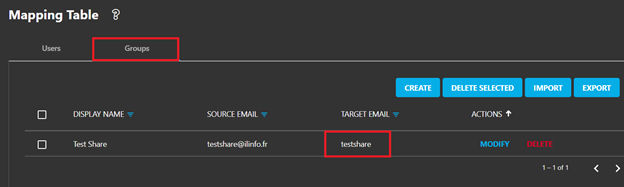
Security group names (without email addresses) can be entered in the mapping table's target email section for SharePoint migrations. This allows you to assign permissions to pre-existing security groups in your Microsoft 365 tenant.
Screenshots