Mail Migration Analysis
Verify and analyze your mail migration completion status.
Why Item Counts Differ
Overview
After completing a mail migration, you may want to verify that all items transferred successfully. However, comparing item counts between source and target systems can be misleading due to how different systems report mailbox statistics.
Important
Key Considerations
Mailbox Size Comparison
Avoid comparing mailbox sizes across systems. Exchange compresses databases and allocates size in such a way that the same mailbox may have different sizes in the source and target systems.
What Cloudiway Migrates
Cloudiway migrates only the mails found in mail folders. The following items are excluded as ignored items:
- Calendar invitations
- Meeting confirmations
- Declined meeting items
- Non-mail item types
Non-Mail Items in Mailboxes
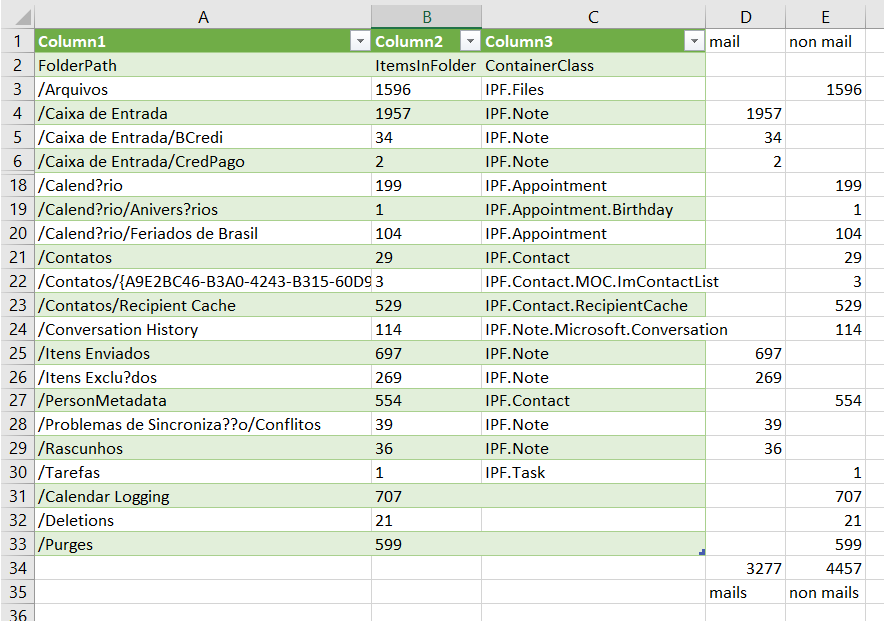
Mailboxes contain thousands of items that are not emails: calendar entries, contacts, tasks, notes, journal entries, and system items. Standard mailbox statistics include all of these, making them unreliable for mail migration verification.
PowerShell Analysis Commands
Get-MailboxStatistics
Warning: This command counts total items but is "completely irrelevant" for mail-only analysis since mailboxes contain thousands of non-mail items.
Get-MailboxFolderStatistics (Recommended)
Recommended: Provides folder-level data with the ContainerClass field, allowing you to identify which folders contain mail items specifically.
Understanding ContainerClass
The ContainerClass field indicates the folder type:
- •
IPF.Note- Mail items - •
IPF.Appointment- Calendar items - •
IPF.Contact- Contacts - •
IPF.Task- Tasks
Understanding Results
Practical Example
A typical migration analysis might show the following breakdown:
| Metric | Count |
|---|---|
| Total items (Get-MailboxStatistics) | 5,374 |
| Mail-type items only | 3,277 |
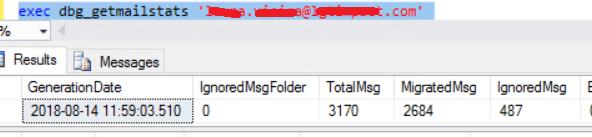
| Items migrated | 2,684 |
| Ignored items (invites, etc.) | 487 |
Missing Items in OWA/Outlook?
If items appear to be missing in OWA or Outlook despite successful migration, this may indicate Microsoft replication issues rather than migration problems. These cases may require a Microsoft support ticket.
Verification Best Practice
Troubleshooting Checklist
- Use Get-MailboxFolderStatistics, not Get-MailboxStatistics
- Filter for mail-type items (IPF.Note) only
- Account for ignored items (calendar invites, confirmations)
- Check Cloudiway migration report for actual migrated/ignored counts
- Spot-check important folders for expected content
Screenshots