General or Private Channel Teams Error
Resolve SharePoint provisioning errors for Teams channels.
Error Messages
Private Channel Migration Error
FATAL_ERROR : Unable to connect to target teams: Unable to generate SkypeToken to Provision Channel SP site. Error: Object reference not set to an instance of an object.
General Channel in Private Group Error
Unable to find target Folder. Run the preprocessing task, please
Root Cause
Teams Channel Storage Architecture
These errors occur due to a limitation in Microsoft's system when handling private and general channels within Teams environments. Specifically:
- • SharePoint Site Not Provisioned
Teams channels store files in SharePoint. The SharePoint site for private channels must be explicitly provisioned.
- • Lazy Provisioning
Microsoft uses "lazy provisioning" - the SharePoint site is only created when someone first accesses the Files tab.
- • New Channels
Newly created channels in the target may not have their SharePoint infrastructure ready.
Solution
Trigger SharePoint Site Provisioning
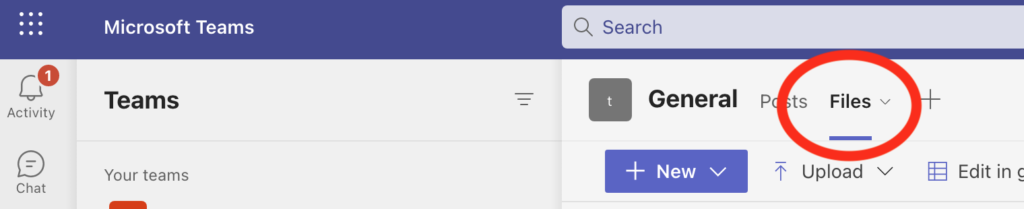
The solution is to trigger SharePoint site provisioning by accessing the Files tab in the affected channel:
- 1
Open Target Teams
Navigate to the affected Team in your target environment.
- 2
Go to the Channel
Select the private or general channel that's causing the error.
- 3
Click the Files Tab
Click on the Files tab within that channel. This action triggers SharePoint site provisioning.
- 4
Wait for Provisioning
Wait for the Files tab to load completely. This may take a few moments.
- 5
Restart Migration
After the Files tab loads successfully, restart the migration process in Cloudiway.
Multiple Channels
Bulk Provisioning (PowerShell)
For many channels, consider using PowerShell to provision SharePoint sites in bulk before migration. Contact Cloudiway support for guidance on automated provisioning scripts.
Screenshots