How to Migrate Teams Private Channels
Complete guide to migrating private channels in Microsoft Teams.
Standard vs Private Channel Architecture
Standard Channels
Private Channels
Overview
Private channels in Microsoft Teams require special handling during migration because they have a fundamentally different architecture than standard channels. Understanding this difference is key to successfully migrating Teams with private channels.
Key Point
Technical Difference
Standard Channels
Share a single SharePoint site Document Library. Files are organized by folder within the shared library, making them straightforward to migrate together.
Private Channels
Each private channel receives its own dedicated SharePoint site. These sites may be hidden from the SharePoint Admin Center view, but Cloudiway can detect and migrate them.
URL pattern: /sites/teamname-privatechannelname
Migration Process
Set Up Connectors
Configure your source and target Office 365 connectors with appropriate permissions.
Run Get List Operation
In the Sites/Groups migration section, use the Group List and run "Get List" to discover all Teams and Groups.
Locate and Configure Team
Find the team containing private channels in the migration list. Assign the Target connector and specify the Target Recipient Type.
Execute Pre-Processing (Critical)
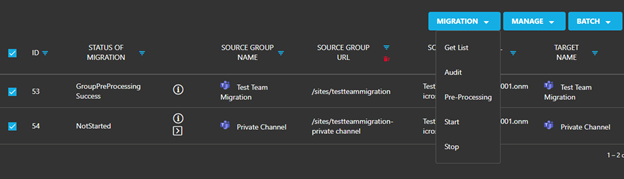
Run the Pre-Processing task on the team. This step:
- • Creates the team in the target including all private channels
- • Adds a separate item to the Group Migration List for every private channel
- • Provisions the dedicated SharePoint sites for private channels
Migrate Content
Run migration tasks for both the standard channels (team) and each private channel. These can be initiated simultaneously or sequentially.
Important
Identifying Private Channels
Private channels display distinguishing markers in the migration list:
Private Channel Icon
A dedicated icon appears next to the channel name
Source URL Pattern
URL contains: /sites/teamname-privatechannelname
Email Address Match
The Source Group Email Address matches the parent team's address
Screenshots