Google Shared Contacts Not Visible
Fix visibility issues with synchronized contacts in Google.
Last updated: 2025-01-15 Troubleshooting
Issue
⚠️
Problem Description
After syncing via Cloudiway GALSync, shared contacts do not appear in your Google Address book.
Resolution Flow
👁️
Not Visible
Contacts hidden
→
⚙️
Adjust Settings
Admin Panel
→
✓
Visible
Contacts shown
Root Cause
Why This Happens
Your Google Workspace settings may be configured to not show Domain Shared Contacts in the browsable directory. This is a setting in the Google Admin Panel, not a Cloudiway issue.
Solution
Steps to Fix
1
Access Google Admin Panel
Log into your Google Admin Console at admin.google.com
2
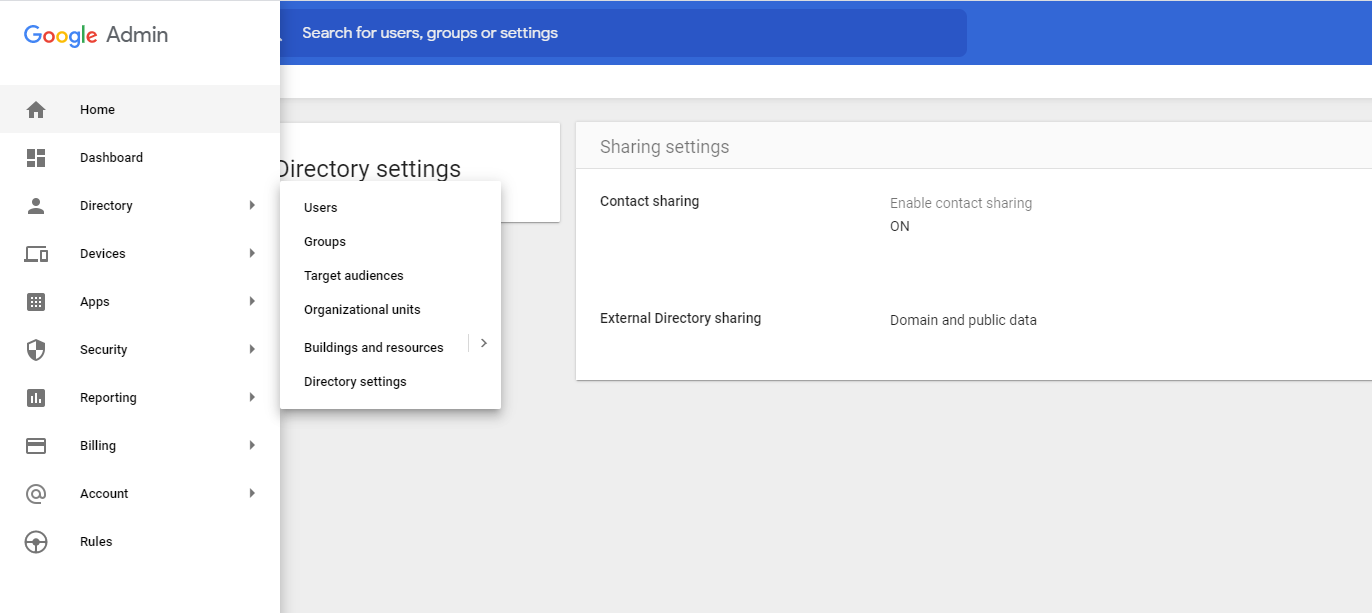
Navigate to Directory Settings
Go to Directory → Directory Settings
3
Open Contact Sharing Settings
Enter the Contact Sharing Settings section
4
Enable Domain Shared Contacts
Enable "Domain Shared Contacts" in the browsable Directory options within Contact Manager
After Enabling
Once you enable Domain Shared Contacts, the synchronized contacts will become
visible to users in their contact management interface.
Screenshots