How Does the Free Busy Work
Understanding the architecture behind calendar availability sharing.
Free/Busy Query Flow
Overview
Free/Busy is part of the coexistence range of tools: it manages cross-platform communication with no impact on the end-user. This service enables calendar availability queries across different messaging platforms, making it seamless to schedule meetings with users on other systems.
Key Benefit
Users don't need to know which platform attendees are using. The coexistence server handles all cross-platform queries automatically and transparently.
Supported Systems
✓ Supported
- • Office 365 / Exchange Online
- • Google Workspace
- • Exchange On-Premises 2013+
✗ Not Supported
- • Google-to-Google lookups
- • Same SMTP domain (without special config)
- • Free Gmail accounts linked to work addresses
Architecture Types
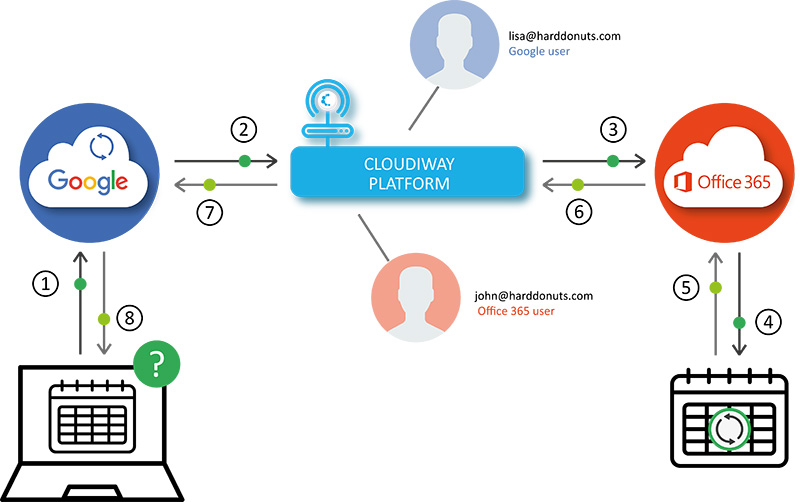
Full Cloud
Enables availability sharing between two SaaS platforms (e.g., Google to Office 365).
Flow:
- User initiates a calendar meeting request
- Platform (e.g., Google) forwards request to Cloudiway
- Cloudiway queries the other platform (e.g., Office 365)
- Results return to the originating user
On-Premises/Cloud
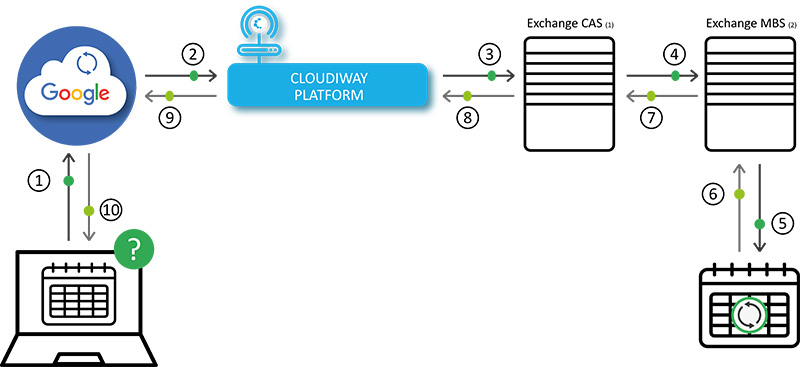
Connects SaaS with on-premises Exchange servers.
Flow:
- Similar to cloud version
- Routes through Exchange Client Access Servers
- Mailbox Servers handle calendar lookups
- Results return through the chain
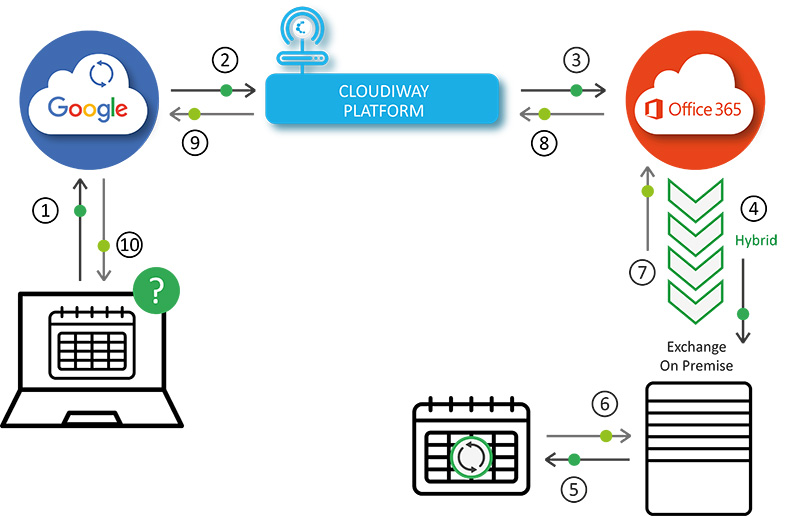
Hybrid Office 365/Cloud
Combines cloud and on-premises systems in hybrid configurations.
Flow:
Office 365 acts as an intermediary, querying on-premises Exchange when mailboxes reside there. Cloudiway coordinates the cross-platform portions.
Shared Domain
When two platforms use the same email domain (common during migrations).
Requirements:
- • Maintain separate mail forwarding configuration
- • Configure user location mappings within Cloudiway
- • Define which users are on which platform
Scalability
Multi-Platform Support
The service supports multiple connectors, enabling three- or four-way communication between various messaging systems simultaneously.
Example Configurations:
- • Google ↔ Office 365 ↔ Exchange On-Premises
- • Multiple Office 365 tenants
- • Multiple Google Workspace domains
Complex Environments
Screenshots