How to Delete Mailbox Content in Office 365 or Exchange
Use PowerShell to remove mailbox content for migration testing.
Last updated: 2025-01-15 How To
⚠️
Irreversible Operation
Deleting mailbox content is permanent and cannot be undone. This procedure should only be used in test environments or when preparing for remigration.
Overview
The process involves using PowerShell's Search-Mailbox
command with the -DeleteContent parameter
to remove mailbox contents. This is useful during migration testing or when you need
to clear a mailbox before remigration.
Prerequisites: Enable Mailbox Import Export Role
Option 1: Office 365 Admin Center
- Access the Office 365 Portal and navigate to Admin → Exchange
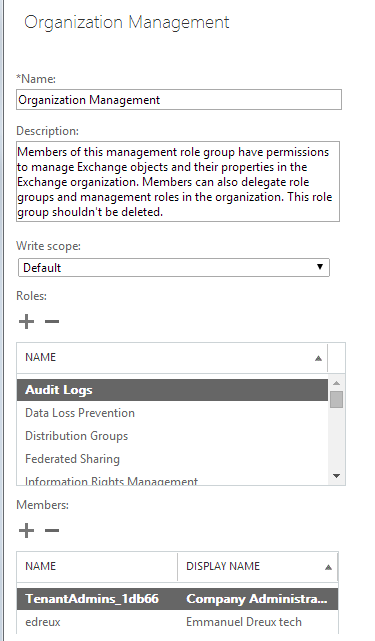
- Select Permissions and open Organization Management
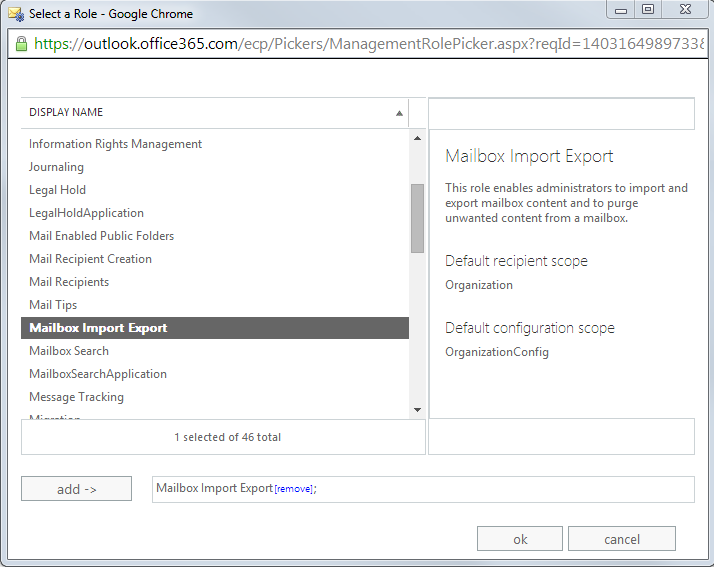
- Click the plus sign (+) under Roles
- Add the "Mailbox Import/Export" role
- Verify your account is a member of Organization Management
Option 2: PowerShell
New-ManagementRoleAssignment `
-Name "Import Export Enterprise Support" `
-User "[Admin Identity]" `
-Role "Mailbox Import Export"
Deletion Commands
Delete All Mailbox Content
Search-Mailbox -Identity "John Doe" -DeleteContent
This removes mails, contacts, and calendars but does not delete personal folders.
Delete Calendar Entries Only
Search-Mailbox -Identity "John Doe" -SearchQuery "kind:meetings" -DeleteContent
Removes only calendar entries while preserving other mailbox content.
Verify Mailbox Contents Before Deletion
Get-MailboxFolderStatistics -Identity [email protected] | Select FolderPath,ItemsInFolder
Always verify mailbox contents before performing deletion operations.
Critical Warning
Use at Your Own Risk
- • Customers use these scripts at their own risk
- • Cloudiway provides no support for script use
- • No guarantee of data recovery is offered
- • This operation is irreversible
Best Practice
Always test deletion commands on a test mailbox first before running on production mailboxes.
Consider backing up mailbox content before deletion.
Screenshots