IMAP Connector Configuration
Configure IMAP connectors for email migrations from any IMAP-compatible server.
Overview
IMAP connectors enable Cloudiway to connect to any IMAP-compatible mail server for email migration. This guide explains how to configure IMAP connectors to facilitate migrations from servers like Postfix, Cyrus, Dovecot, and others.
IMAP Migration Architecture
Migration Modes
Administrator Account Mode
Use this option when you can define an administrator account with access to all mailboxes. This requires no user involvement and allows admins to migrate all mailboxes without knowing individual passwords.
Best for: Organizations with centralized admin control over mail servers.
Self-Service Mode
When admin accounts aren't feasible, users receive email links to the migration tool. They enter their IMAP credentials, and the migration proceeds automatically on Cloudiway servers.
Best for: Hosted environments or when individual credentials are required.
Configuration Steps
Step-by-Step Setup
Create New Connector
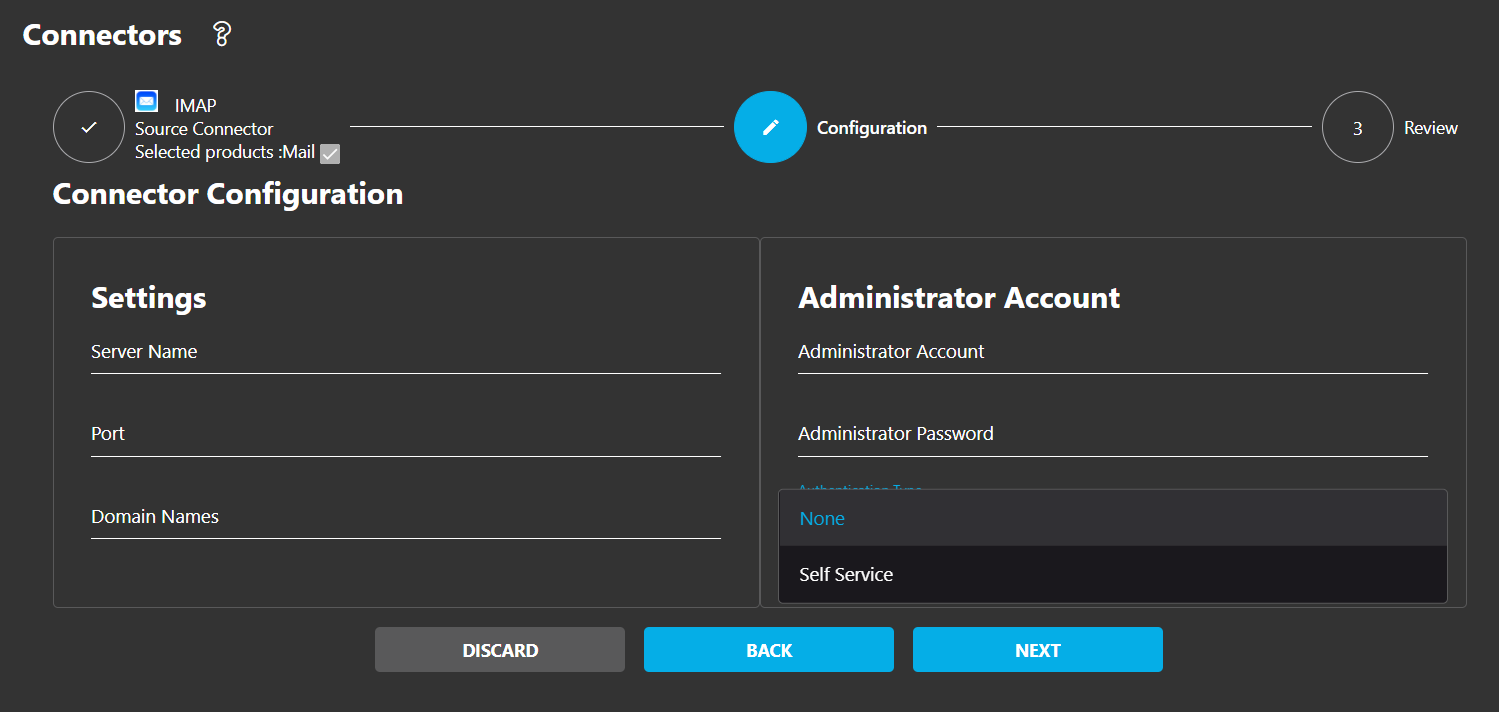
Navigate to Connectors and select NEW. Choose IMAP as the connector type.
Set Basic Options
Set a descriptive connector name and select Mail as the service option. Click NEXT.
Enter Server Details
Enter the IMAP server details including domain, server name/IP, and port number.
Select Authentication Type
Choose None for admin access or Self Service when admin accounts aren't available.
Specify Domain Names
Enter the domain names you want to manage with this connector.
Complete Setup
Review your settings and click COMPLETE to create the connector.
Ports & Authentication
Supported IMAP Ports
| Port | Protocol | Security |
|---|---|---|
| 143 | Standard IMAP | Plain/STARTTLS |
| 993 | IMAP over SSL | SSL/TLS Encrypted |
Authentication Options
- • None: Administrator with full mailbox access
- • Self Service: When admin accounts unavailable
Server-Specific Notes
Postfix Servers
Postfix servers don't support admin accounts accessing all mailboxes. Instead, configure identical "magic passwords" for all accounts and leave the administrator field blank.
Cyrus IMAP Servers
Cyrus IMAP servers similarly lack admin account capabilities, necessitating self-service migration where users provide their own credentials.
Magic Password Authentication
Please also ensure that the IMAP server is accessible over the internet.
Screenshots