Google.Apis.Requests.RequestError Invalid Credentials
Verify user account status and license permissions to resolve this error.
Error Message
Google API Error
Google.Apis.Requests.RequestError Invalid Credentials [401]

Location: Authorization - header

Reason: authError
This error occurs during various Google Workspace migration operations.
Authentication Failed
Scenario 1: Free/Busy Operations
Causes
- • Invalid login credentials in the Free/Busy User Login field
- • Expired password or inactive account
- • User lacks valid Google Workspace Calendar access
Solution
Verify the user account is active with valid Google Workspace Calendar permissions. Update the credentials in the connector if the password has changed.
Scenario 2: Google Drive Migration
Causes
- • User lacks valid Google Workspace license for Drive access
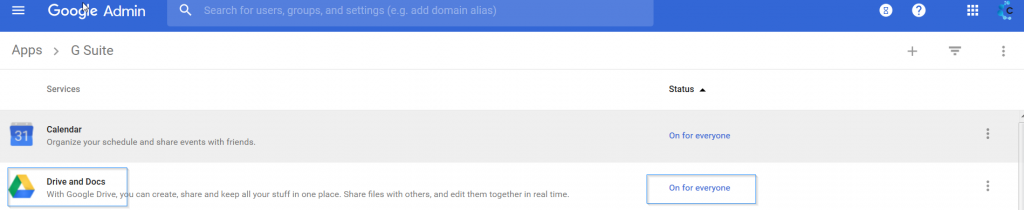
- • Drive and Docs app disabled for the user's organizational unit
Solutions
- 1. Check user licenses in Google Admin Console - some licenses (like Google Vault alone) don't include Drive
- 2. Navigate to Admin → Apps → Google Workspace and confirm "Drive and Docs" is activated for the organization or user's group
General Troubleshooting
Step-by-Step Verification
Check Account Status
In Google Admin Console, verify the user account is active and not suspended.
Verify License Assignment
Ensure the user has a license that includes the required service (Calendar for Free/Busy, Drive for file migration).
Check App Availability
Confirm the required apps (Calendar, Drive) are enabled for the user's organizational unit.
Restart Migration
After fixing the issues, restart the migration for affected users.
License Check
Screenshots