Add Manager to Shared Drive Error
Resolving the 200-member limit issue for Shared Drive migration.
Last updated: 2025-01-15 Troubleshooting
Overview
Error Message
"Could not add migration account as Organizer of Shared Drive. Google.Apis.Requests.RequestError Bad Request... Sorry, you cannot share with that many individual recipients."
Google Shared Drive Limit
200
Maximum Members
Per Shared Drive user list
Root Cause
Why This Happens
Google imposes a limitation of up to 200 members on shared drive user lists. When the migration account owner isn't in this list and the list is already full, the system cannot add the member as "Manager."
Scenario
- • Shared Drive has 200 members
- • Migration account is not in the member list
- • Cloudiway cannot add the account as Manager
- • Audit or migration fails with the error
Solution
Add Migration Account Manually
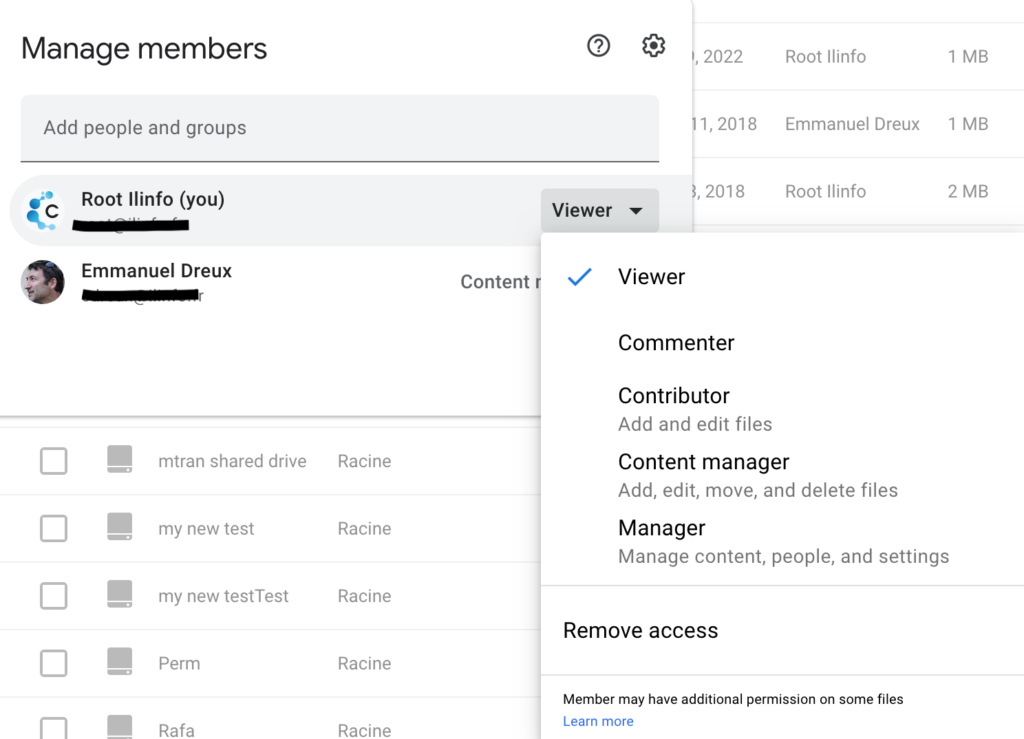
Add the migration account owner to the Shared Drive's member list within the 200-user limit and assign them the "Manager" role.
Option 1: Direct Shared Drive Access
1. Open the Shared Drive in Google Drive
2. Click "Manage members" on the Shared Drive
3. Remove a member if at 200 capacity
4. Add the migration account email
5. Set role to "Manager"
Option 2: Google Admin Console
1. Log into Google Admin Console
2. Navigate to Apps → Google Workspace → Drive and Docs
3. Manage Shared Drives and modify membership
4. Assign Manager role to migration account
After Adding Manager
Once the migration account has Manager role, retry the audit or migration.
The operation should now complete successfully.
Screenshots