OneDrive Administrator Account Permissions Setup
Grant admin access to OneDrive accounts for migration.
Admin Access Setup
Overview
Important Limitation
By default, administrators don't have access to any OneDrive accounts in Office 365. This manual process grants administrative permissions through SharePoint's Site Collection Owner functionality.
To migrate OneDrive content, the migration admin account needs access to each user's OneDrive. This guide shows how to grant that access through the SharePoint Admin Center.
Requirements
To complete this process, you need:
- ✓ SharePoint Admin Center Access
Global Admin or SharePoint Admin role
- ✓ Target Username
The user profile whose OneDrive needs to be accessed
- ✓ Admin Account
The account that requires OneDrive access (your migration admin)
Setup Steps
1 Access SharePoint Admin Center
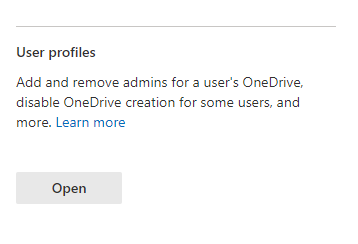
Navigate to the SharePoint administration center and locate the User Profiles section.
URL: https://admin.microsoft.com →
Admin Centers → SharePoint
2 Open User Profile Management
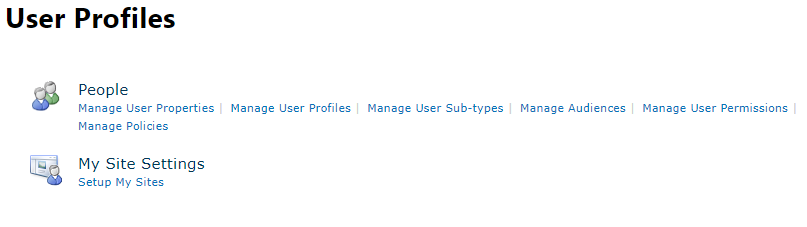
Click Open in User Profiles, then select Manage User Profiles under the People category.
3 Search for Target User
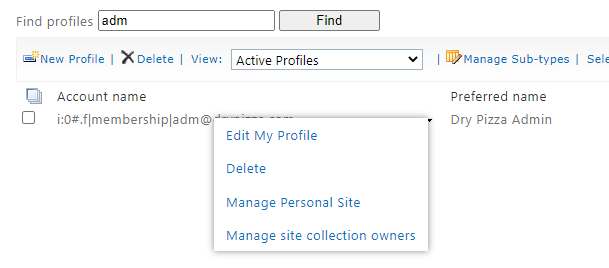
Use the search bar to locate the specific username whose OneDrive needs administrative access.
4 Access Owner Management
Select the dropdown arrow next to the found user and choose Manage Site Collection Owners.
5 Grant Administrative Access
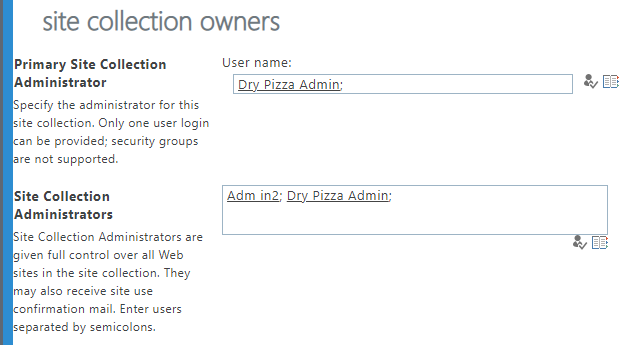
Under Site Collection Owners, add the admin account that requires authorization for migration.
After adding, the admin account will have full access to this user's OneDrive for migration purposes.
Bulk Operations
Post-Migration Cleanup
After migration is complete, consider removing the admin account from Site Collection Owners for security best practices.
- → Document all accounts where admin access was granted
- → Remove admin access after migration verification
- → Audit OneDrive permissions periodically
Screenshots