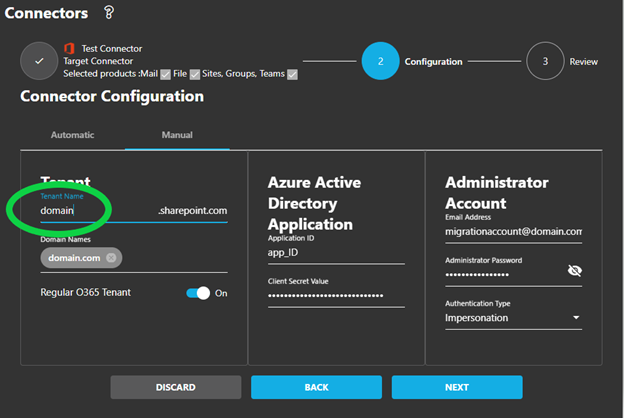
Pre-Processing Error: Wrong Tenant
Fix authentication errors caused by incorrect tenant name configuration.
Error Message
Pre-Processing Authentication Failure
Pre-Processing Error: Error Authenticating: invalid_resource... You might have sent your authentication request to the wrong tenant.
This error occurs during preprocessing when the connector's tenant name is incorrectly configured.
Tenant Name Format
Wrong
- ✗
contoso.com - ✗
contoso.onmicrosoft.com - ✗
contoso.net
Correct
- ✓
contoso - ✓
fabrikam - ✓
mycompany
Root Cause
Incorrect Tenant Name Format
This error occurs when the Tenant Name field in your connector is incorrectly configured. Common mistakes include:
Adding .com, .net, .org, or .onmicrosoft.com
Entering your email domain instead of the technical tenant name
Entering https://tenant.sharepoint.com instead of just the tenant name
Solution
Find and Enter Correct Tenant Name
Log into the Microsoft 365 Tenant
Sign in to the Office 365 tenant you're configuring the connector for.
Navigate to SharePoint
Open SharePoint from the app launcher or go directly to SharePoint.
Extract Tenant Name from URL
Look at the browser URL bar. Your tenant name is the part before
.sharepoint.com
https://contoso.sharepoint.com/... In this example, the tenant name is: contoso
Update Connector Configuration
Enter only the technical tenant name (no extensions) in the Tenant Name field of your Cloudiway connector.
Important
Quick Reference
| SharePoint URL | Tenant Name to Enter |
|---|---|
| https://contoso.sharepoint.com | contoso |
| https://fabrikam-corp.sharepoint.com | fabrikam-corp |
| https://m365x123456.sharepoint.com | m365x123456 |
Screenshots